


 Pro Benefits
 Environ
 Conditions générale de vente
 Confidentialité
 Child Safety & Protection
 Notifications
 Ayrush Global It Services Pvt Ltd
White Spots on Mobile Screen: Causes, Fixes, and When to Worry
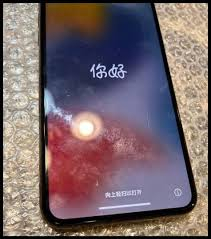
If you’ve recently noticed white spots on your mobile screen, it can be both frustrating and worrying. Whether it’s a faint patch that appears under bright light or a noticeable glowing spot that refuses to disappear, these screen issues can affect your user experience and hint at deeper hardware or software problems. Sometimes, unexpected changes on your phone’s screen may even make you wonder if your device has been compromised—raising concerns like how to remove a hacker from my phone.
In this article, we’ll discuss what causes white spots, how to fix them effectively, and when such issues might indicate something more serious.
1. Understanding What White Spots on a Mobile Screen Really Are
White spots on mobile screens appear as bright or faded patches that stand out from the rest of the display. These spots may be static or change slightly in size and brightness.
They can result from hardware issues, such as screen pressure or damage, or software glitches, including pixel malfunctions or display driver bugs. In rare cases, white spots might appear after malicious software manipulates your display settings, which makes it essential to understand how to remove a hacker from your phone if you suspect foul play.
2. Common Causes of White Spots on Mobile Screens
Let’s break down the most common reasons you might see these white marks or patches:
a. Pressure Damage
If your phone has been dropped or pressed too hard—especially in your pocket or bag—the LCD or OLED layers beneath the screen can become damaged. This pressure can cause light to leak through specific areas, creating visible white spots.
b. Faulty LCD or Backlight
A defective LCD or backlight diffuser can cause uneven light distribution, which often results in bright or white areas on the screen. This is more common in older phones or after exposure to heat.
c. Dead or Stuck Pixels
Each pixel on your display is a light-emitting diode. Sometimes, these tiny components malfunction—either freezing on white (stuck pixel) or turning off (dead pixel). Tools and apps can sometimes fix stuck pixels by cycling through colors rapidly.
d. Water or Moisture Damage
If your phone has been exposed to humidity or water, moisture may seep into the screen layers, creating uneven white or cloudy spots. Even minor exposure can cause visible marks if left untreated.
e. Software Glitches or Malware
While less common, certain malware can alter your display settings, brightness calibration, or GPU rendering, leading to odd screen behavior—including white spots. This is where knowing how to remove a hacker from my phone becomes critical to ensure the issue isn’t linked to cyber interference.
3. How to Diagnose the Source of White Spots
To determine whether the issue is hardware or software related, follow these steps:
-
Restart Your Phone: Sometimes a simple reboot clears minor software issues.
-
Take a Screenshot: If the white spots appear in the screenshot, it’s a software issue. If not, it’s likely a hardware problem.
-
Inspect Under Bright Light: Check if the spots change with brightness or angle—this can reveal if they’re due to pressure or backlight bleeding.
-
Run a Pixel Test: Apps like “Dead Pixel Test and Fix” can help identify and possibly fix dead or stuck pixels.
4. How to Fix White Spots on a Mobile Screen
Depending on the cause, there are several effective ways to fix white spots:
a. Use Gentle Pressure or Heat
If the white spot is caused by a minor pressure issue or air bubble under the screen, try:
-
Gently rubbing the affected area with a soft microfiber cloth.
-
Warming the area slightly (using indirect heat, such as from your hand or a low-temperature hair dryer).
⚠️ Caution: Don’t press too hard or apply direct heat—this can worsen the damage.
b. Pixel-Repairing Apps
For stuck pixels, download a pixel-fixing app. These apps flash colors at high speed to reactivate unresponsive pixels. Run the program for 10–30 minutes to see if it improves.
c. Update or Reset Your Device
If the issue is linked to software:
-
Go to Settings > Software Update and install the latest version.
-
If that fails, backup your data and perform a factory reset.
(This step can also help remove any malicious files if you suspect hacking.)
d. Replace the Screen or LCD
If the problem persists and appears hardware-related, it’s best to visit a certified service center. Replacing the screen or backlight panel is often the only long-term fix for physical damage.
5. Could a Hacker Cause White Spots?
It might sound far-fetched, but malicious software or hackers can sometimes alter your phone’s visual settings. A compromised device may experience strange performance issues—such as screen flickering, overheating, or display anomalies.
If your phone exhibits both white spots and suspicious behavior—like apps opening automatically, slow response, or unexpected pop-ups—it’s wise to check whether you’ve been hacked.
Here’s a quick guide on how to remove a hacker from your phone if you suspect one:
-
Disconnect from the Internet (turn on airplane mode).
-
Run an Antivirus Scan using trusted software.
-
Uninstall Unknown Apps or those installed outside official stores.
-
Update Your OS to patch vulnerabilities.
-
Change All Passwords for email, social media, and banking apps.
-
Factory Reset your phone if the behavior continues.
By doing this, you ensure that display issues aren’t linked to deeper security threats.
6. How to Prevent White Spots on Your Screen
Prevention is always better than repair. Here’s how to keep your screen flawless:
-
Avoid Pressure: Don’t keep your phone in tight pockets or under heavy objects.
-
Use a Quality Case and Screen Protector: This protects against drops and scratches.
-
Keep Away from Moisture: Even humidity can damage the screen layers.
-
Avoid Overheating: Continuous exposure to heat weakens LCD layers and can create white spots.
-
Regularly Check for Malware: Following the same steps as when learning how to remove a hacker from my phone helps prevent unwanted system interference.
7. When to Seek Professional Help
If your troubleshooting doesn’t solve the issue or if the white spots are spreading, it’s time to consult a technician. Certified repair centers can assess whether the issue lies in the backlight diffuser, LCD layers, or motherboard. Sometimes, even the smallest internal crack can cause light leakage that can’t be fixed at home.
Professional repair ensures your display is restored correctly without voiding your warranty.
8. Final Thoughts
Seeing white spots on your mobile screen can be alarming, but the good news is that many of these issues are fixable. From pressure marks and stuck pixels to software glitches, identifying the root cause is key to finding the right solution.
Remember, screen irregularities can sometimes coincide with suspicious phone activity. If you ever feel that your device is behaving oddly, it’s smart to learn how to remove a hacker from my phone—because a secure device is just as important as a flawless display.
Take care of your phone like you would any valuable device—protect it from damage, keep your software up to date, and stay alert to signs of both physical and digital trouble.
 French
 English
 Arabic
 Spanish
 Portuguese
 Deutsch
 Turkish
 Dutch
Dutch
 Italiano
 Russian
 Romaian
 Portuguese (Brazil)
 Greek
Greek
