


 Pro Benefits
 About
About
 Koşullar
 Gizlilik
 Child Safety & Protection
 Bildirimler
 Ayrush Global It Services Pvt Ltd
6 Reasons Why Dreamcast is an Ultimate Platform for Virtual Conferences
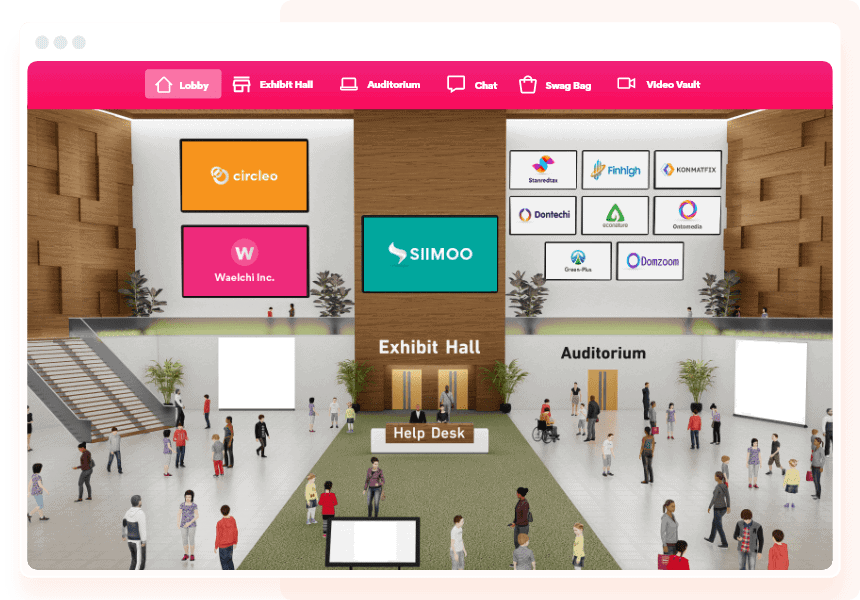
Virtual conferences have changed how people meet, share ideas, and learn from each other. They’ve made it easier to bring together people from different places without worrying about travel or venue size. But running a virtual conference is not just about sending out a link and hoping people show up. It takes planning, tools, and a system that works well for both organizers and attendees.
Dreamcast is one of those platforms that helps make virtual conferences smooth. It’s not just about video calls. It’s about creating an experience that feels complete. From registration to feedback, every part matters. Let’s look at six reasons why Dreamcast stands out when it comes to virtual conferences.
1. Easy Registration and Ticketing
The first step for any conference is getting people to sign up. Dreamcast makes this part simple. Organizers can create forms that ask for the right details. Whether it’s name, email, job title, or anything else, it can be added. The forms can be shared through websites, emails, or social media.
Once someone registers, they get a ticket with a QR code or access link. The system supports different ticket types. You can have free tickets, paid tickets, group passes, or VIP access. Payments are handled online, and everything is tracked in one place.
This helps organizers know who’s coming and how many people to expect. It also helps with planning sessions, sending reminders, and managing access.
2. Smooth Live Streaming
Streaming is the heart of any virtual conference. If the video lags or the sound breaks, people lose interest. Dreamcast offers tools that make streaming smooth. The video works well on phones, laptops, and tablets. The sound is clear, and the stream doesn’t freeze.
Organizers can choose how they want to stream. Some sessions can be public, others private. There’s also support for multiple sessions at the same time. That means you can run panels, workshops,s and keynotes without mixing things up.
The platform also allows recording. So if someone misses a session, they can watch it later. This helps with reach and keeps the content useful even after the event ends.
3. Interactive Features
Watching a video is fine, but people want more. They want to ask questions, vote in polls and talk to others. Dreamcast includes features that make the conference interactive. Attendees can use live chat, join Q&A sessions and take part in polls.
Speakers can ask questions and get instant replies. Organizers can run quizzes, collect feedback and keep people engaged. These tools help make the event feel active. People don’t just watch, they take part.
There’s also support for breakout rooms. Smaller groups can meet and talk about specific topics. This helps with networking and learning.
4. Custom Branding and Layouts
Every conference has its own style. Dreamcast allows organizers to change the look of the platform. You can add logos, colors and banners. The layout can be changed to match the theme of the event.
This helps with branding. Attendees feel like they’re part of something special. It also makes the event look more professional. Sponsors and partners can be added to the platform. Their logos and messages can be placed where people will see them.
The platform doesn’t feel like a plain video call. It feels like a real event space, just online.
5. Real-Time Analytics
During the conference, it helps to know what’s going on. Dreamcast gives organizers a dashboard that shows real-time data. You can see how many people joined, which sessions are popular and when people dropped off.
This helps with quick decisions. If one session is getting more views, maybe it should be extended. If people are leaving early, maybe the next session needs a change. The data also helps after the event. You can see what worked and what didn’t.
It’s not just about numbers. It’s about understanding how people are reacting and using that to improve.
6. Post-Event Tools
After the conference ends, the work isn’t over. Dreamcast offers tools to help with follow-up. Organizers can send thank-you notes, share recordings and collect feedback. Surveys can be sent out to ask what people liked and what could be better.
The platform also helps with lead generation. If someone showed interest in a session or product, that info can be saved. Organizers can use it to reach out later. This helps with marketing and future planning.
The recordings can be used for blogs, social media or training. The feedback helps with planning the next event. And the data helps with reporting.
Final Thoughts
Virtual conferences are not just a backup plan. They’re a real way to bring people together. But they need the right tools. Dreamcast offers a platform that covers all the key parts. From registration to streaming, from branding to feedback, everything is handled.
Organizers don’t need to worry about tech problems or missing features. Attendees get a smooth experience. And the event feels complete, even if it’s online.
If you’re planning a virtual conference, these six reasons show why Dreamcast is worth looking into. It’s not just about running an event. It’s about making it work well for everyone.

 English
 Arabic
 French
 Spanish
 Portuguese
 Deutsch
 Dutch
Dutch
 Italiano
 Russian
 Romaian
 Portuguese (Brazil)
 Greek
Greek
