


 Pro Benefits
 About
About
 Koşullar
 Gizlilik
 Child Safety & Protection
 Bildirimler
 Ayrush Global It Services Pvt Ltd
What Makes Perfect CV Formatting Services: Texas Expert Guide
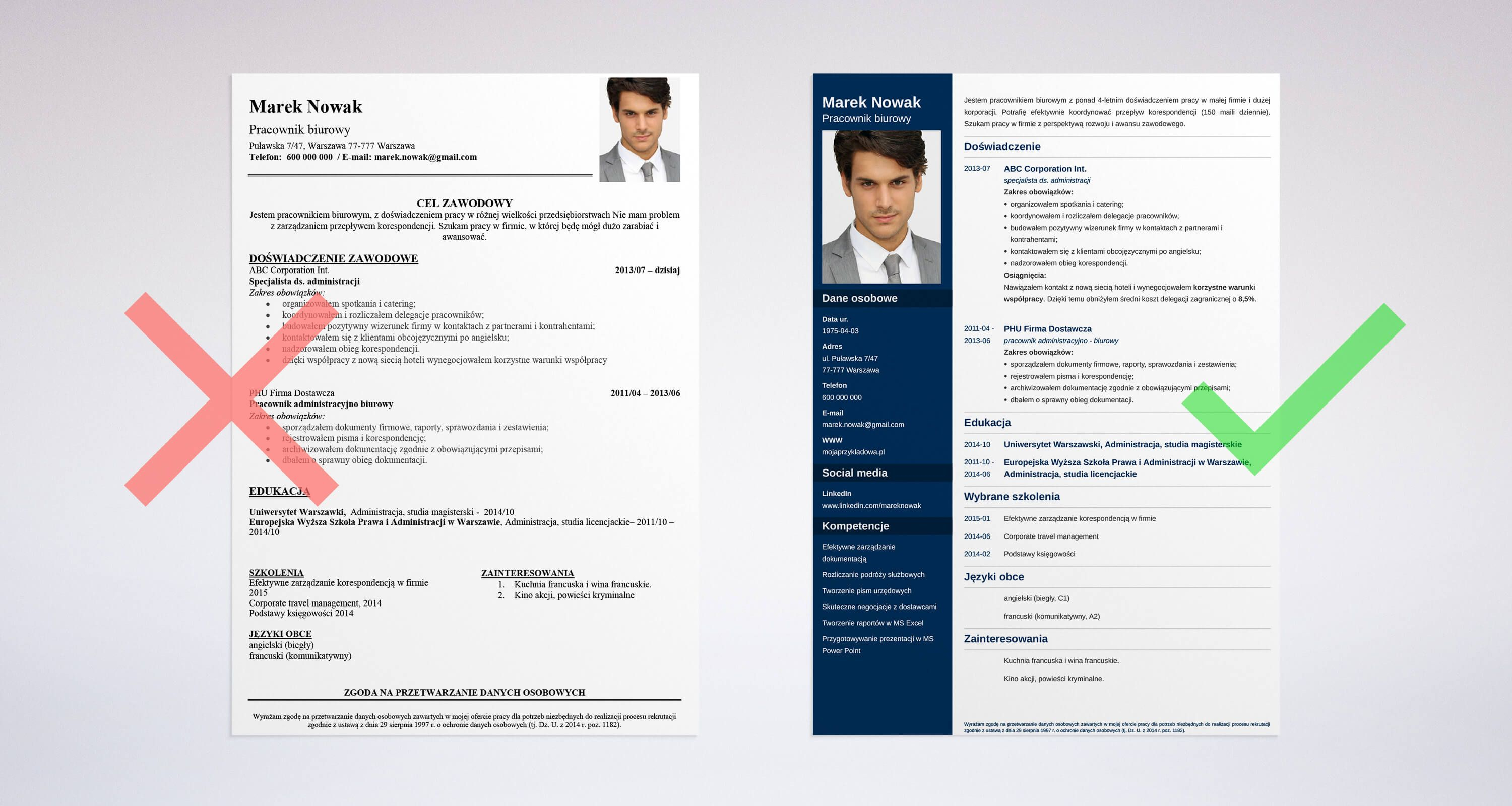
Creating an outstanding CV can transform your job search experience. Whether you're seeking opportunities in Texas, California, New York, or Florida, proper CV formatting serves as your ticket to landing that dream interview.
Why Does CV Formatting Matter So Much?
Think of your CV as your personal marketing brochure. It needs to grab attention within seconds and communicate your value proposition clearly.
Hiring managers typically spend just 7-10 seconds reviewing each application. During this brief window, your formatting either works for you or against you.
Smart CV formatting services guides the reader's eye to your strongest qualifications first. This strategic approach significantly increases your chances of making it to the interview stage.
The Science of Visual Processing
Human brains process visual information faster than text. A well-structured CV creates positive impressions before anyone reads a single word.
Poor formatting suggests carelessness and lack of attention to detail. These aren't qualities employers want in their team members, especially in competitive markets like Texas.
Core Components of Outstanding CV Structure
Creating an Impressive Header
Your header acts as your professional billboard. Include these essential elements:
- Your full name in prominent, bold typography
- Professional email using your actual name
- Complete phone number with area code
- Active LinkedIn profile link
- Current city and state location
Skip unnecessary personal details like birth dates, relationship status, or photographs. These elements can introduce bias and aren't relevant for most positions.
Smart Contact Details Strategy
Choose an email address that reflects professionalism. Avoid childhood nicknames or quirky handles that might create wrong impressions.
List your city and state without revealing your complete home address. This approach provides location context while maintaining privacy boundaries.
Selecting Your Optimal CV Structure
Traditional Chronological Approach
This classic method arranges work history in reverse chronological sequence. It performs best for professionals with:
- Steady employment progression
- Growth within similar industries
- Minimal career interruptions
Skills-Focused Functional Style
This approach emphasizes abilities over employment timeline. Consider this format if you're:
- Transitioning between career fields
- Returning to work after breaks
- New graduate with limited experience
Balanced Hybrid Method
This versatile combination showcases both competencies and career progression. It adapts well to various professional situations and industry requirements.
Typography and Design Elements
Selecting Professional Fonts
Choose clean, readable typefaces such as:
- Arial for modern appeal
- Calibri for contemporary look
- Times New Roman for traditional feel
- Helvetica for clean simplicity
- Georgia for elegant readability
Avoid ornate or decorative fonts that compromise readability. Remember that applicant tracking systems may struggle with unusual typography choices.
Optimal Size Standards
Maintain 10-12 point sizing for main content and 14-16 point for section headers. Your name can utilize 16-20 point sizing for prominence.
Consistency remains crucial throughout your document. Mixing various sizes creates visual chaos and appears unprofessional.
Strategic Layout and Visual Flow
Mastering White Space
Strategic spacing improves readability dramatically. Resist cramming excessive information onto limited space if it compromises visual clarity.
Maintain uniform margins ranging from 0.5 to 1 inch on all sides. This creates professional appearance and prevents content from being cut during printing.
Logical Section Arrangement
Structure your CV sections in this logical sequence:
- Header with contact details
- Professional summary statement
- Career experience chronology
- Educational background
- Core competencies
- Additional qualifications (certifications, awards)
Effective Bullet Point Usage
Utilize bullet points for highlighting key accomplishments. Begin each point with dynamic action verbs and incorporate measurable results whenever possible.
Keep bullets brief - target 1-2 lines maximum. This approach enhances scanning efficiency and maintains reader engagement.
Critical Formatting Errors to Prevent
Information Overload Problem
Attempting to include everything creates visual overwhelm. Be selective about content inclusion and prioritize most relevant experiences for each application.
Format Inconsistency Issues
Mixing fonts, irregular spacing, or varying bullet styles damage professional credibility. Develop a template and apply it consistently throughout.
File Management Mistakes
Save documents as PDF files to maintain formatting integrity across different platforms and software versions. Word documents may display inconsistently.
Use professional naming conventions: "FirstName_LastName_Resume.pdf" instead of generic titles like "My_Resume.pdf."
Industry-Specific Formatting Approaches
Healthcare and Care Services Focus
Medical field CVs should highlight credentials, licenses, and ongoing education prominently. Employ conservative, clean formatting reflecting industry professionalism.
Create dedicated sections for relevant certifications while maintaining chronological order for clinical experiences.
Technology Field Considerations
Tech industry CVs allow slightly more creative formatting while maintaining professionalism. Consider subtle color elements or modern typography.
Feature technical skills prominently and include portfolio or GitHub profile links when relevant.
Business and Finance Standards
Financial services favor traditional, conservative presentation styles. Utilize classic fonts with minimal decorative elements.
Emphasize quantifiable achievements using specific numbers to demonstrate measurable impact on previous organizations.
ATS Optimization Strategies
Understanding System Requirements
Many organizations utilize applicant tracking systems for initial resume screening. These programs scan for keywords but struggle with complex formatting.
Maintain simple formatting and avoid:
- Complex tables or multi-column layouts
- Graphics, images, or visual elements
- Headers and footers
- Non-standard fonts
Strategic Keyword Integration
Incorporate relevant keywords from job postings naturally throughout your CV. Avoid keyword stuffing while ensuring important terms appear contextually.
Utilize standard section headings like "Work Experience" and "Education" that ATS systems easily recognize and process.
Regional Market Considerations
Texas Employment Landscape
Texas employers value practical experience and measurable results. Emphasize achievements using specific metrics and quantifiable outcomes.
Key industries including energy, healthcare, and technology shape Texas economic landscape. Align your formatting with target industry professional standards.
Multi-State Application Strategy
When pursuing opportunities across Texas, California, New York, and Florida, research regional formatting preferences. Some markets favor conservative approaches while others embrace modern designs.
Professional CV Formatting Services Benefits
Sometimes expert assistance makes sense, particularly for career transitions or executive-level positions. CV formatting services offer specialized knowledge in:
- Industry-specific formatting requirements
- ATS system optimization
- Current design trend awareness
- Strategic keyword placement
Consider professional support if applications consistently fail to generate interview opportunities despite strong qualifications.
Helpful Tools and Resources
No-Cost Online Options
Multiple platforms provide free CV templates and formatting assistance:
- Canva professional resume templates
- Google Docs template library
- Microsoft Word built-in templates
- LinkedIn resume creation tool
Advanced Software Solutions
For sophisticated formatting needs, explore:
- Adobe InDesign for professional design
- Microsoft Publisher for layout control
- Specialized resume builder platforms
- Professional template subscription services
Pre-Submission Quality Checklist
Review these critical elements before sending applications:
- Consistent typography throughout document
- Accurate spelling and grammar
- Clear section separation
- Appropriate file format (PDF preferred)
- Professional file naming
- Current contact information
- Content relevance to target position
Frequently Asked Questions
How long should my CV be?
Most CVs should span 1-2 pages maximum. Entry-level candidates typically need one page, while experienced professionals may require two pages for comprehensive background coverage.
Is color appropriate in CV formatting?
Subtle color accents can enhance visual appeal when used sparingly. Choose professional colors like navy blue, charcoal gray, or burgundy. Avoid bright colors that may not reproduce well in print.
How frequently should I update CV formatting?
Review and refresh your CV formatting annually or when changing industries. Design trends evolve continuously, and current formatting demonstrates awareness of professional standards.
Should I customize formatting for each application?
While basic formatting can remain consistent, customize content for individual applications. Adjust keyword emphasis, skill highlighting, and experience relevance based on specific position requirements.
What's the best file format for submissions?
PDF format preserves formatting integrity across various devices and software platforms. Submit PDF files unless employers specifically request alternative formats.
Final Thoughts
Exceptional CV formatting creates opportunities throughout Texas and beyond. It's not merely about visual appeal - it's about presenting qualifications in ways that hiring managers can quickly comprehend and value.
Invest time in proper formatting now. This upfront effort will generate significant returns through improved job search outcomes and enhanced career advancement possibilities.

 English
 Arabic
 French
 Spanish
 Portuguese
 Deutsch
 Dutch
Dutch
 Italiano
 Russian
 Romaian
 Portuguese (Brazil)
 Greek
Greek
