


 Pro Benefits
 About
About
 Terms
Terms
 Privacy
 Child Safety & Protection
 Notifications
 Ayrush Global It Services Pvt Ltd
Professional Odoo Installation Services for Efficient ERP Management
Introduction
Odoo is one of the most powerful and flexible business management platforms available today. It offers a complete suite of applications for accounting, sales, inventory, manufacturing, human resources, CRM, eCommerce, and much more. Businesses of all sizes use Odoo to streamline operations and improve productivity.
However, before companies can enjoy the benefits of Odoo, proper installation is essential. A successful Odoo installation ensures smooth system performance, better security, scalability, and seamless integration with business processes.
What is Odoo Installation?
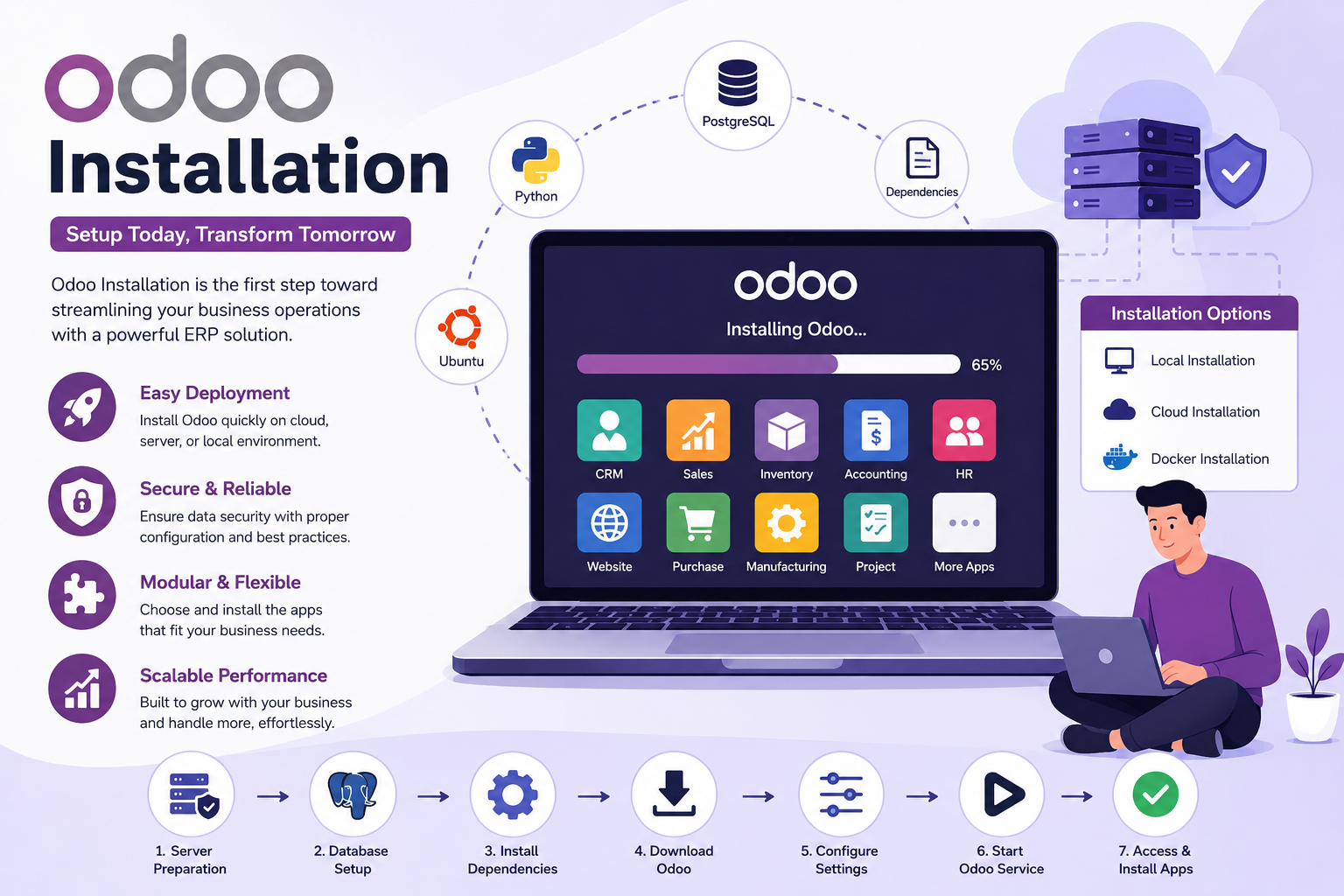
Odoo installation is the process of setting up the Odoo ERP system on a server, cloud environment, or local machine. The installation includes configuring databases, dependencies, web services, security settings, and Odoo modules.
A properly installed Odoo system provides businesses with a stable and efficient ERP platform that supports daily operations without technical interruptions.
Why Proper Odoo Installation Matters
Many companies underestimate the importance of professional ERP installation. Improper setup can lead to slow performance, security vulnerabilities, data loss, and integration problems.
A professional Odoo installation helps businesses:
- Improve system speed and performance
- Ensure data security and backup management
- Avoid installation errors and compatibility issues
- Enable smooth module integration
- Support future upgrades and customization
- Reduce downtime and technical risks
When Odoo is installed correctly, businesses can operate more efficiently and scale their operations with confidence.
System Requirements for Odoo Installation
Before installing Odoo, businesses should ensure that the system meets the required hardware and software specifications.
Basic Requirements
Typical Odoo installation requirements include:
- Linux operating system such as Ubuntu
- Python environment
- PostgreSQL database
- Sufficient RAM and CPU resources
- Internet connection for package installation
- Secure server configuration
For small businesses, a basic VPS server may be enough. Larger organizations handling high transaction volumes often require dedicated servers or cloud infrastructure.
Different Methods of Odoo Installation
There are several ways to install Odoo depending on the technical requirements and business goals.
1. Local Installation
Local installation means setting up Odoo on a personal computer or internal office server. This method is commonly used for development, testing, or small-scale business operations.
Advantages include:
- Full control over the environment
- Easy customization
- No monthly cloud hosting fees
However, local installations require technical expertise for maintenance and backups.
2. Cloud Installation
Cloud-based Odoo installation is becoming increasingly popular. Businesses can deploy Odoo on cloud platforms for better accessibility and scalability.
Benefits include:
- Remote access from anywhere
- Automatic backups
- Improved scalability
- Reduced hardware investment
- Better up time and reliability
Cloud hosting providers often offer managed services that simplify maintenance and security management.
3. Docker Installation
Docker installation allows Odoo to run inside containers. This method is useful for developers and businesses looking for portability and simplified deployment.
Docker-based installations offer:
- Faster deployment
- Environmental consistency
- Easy scaling
- Simplified updates
Many modern businesses prefer Docker for development and production environments.
Steps Involved in Odoo Installation
The installation process usually includes several important stages.
Server Preparation
The first step is preparing the server environment. This includes updating packages, configuring firewall settings, and installing required dependencies.
PostgreSQL Setup
Odoo relies on PostgreSQL as its database management system. Proper database configuration is critical for system performance and reliability.
Installing Odoo Dependencies
Several Python libraries and system packages are required to run Odoo properly. Missing dependencies can cause installation failures or module issues.
Downloading Odoo
Businesses can install either the Community Edition or Enterprise Edition of Odoo. The Community version is open source, while the Enterprise version includes advanced business features and official support.
Configuration Setup
Configuration files define server ports, database access, logging options, and system paths. Proper configuration ensures stable system performance.
Starting the Odoo Service
After setup, the Odoo service is started and accessed through a web browser. Administrators can then create databases and install required business modules.
Common Challenges During Odoo Installation
Although Odoo installation may appear simple, businesses often encounter technical challenges.
Some common issues include:
- Dependency conflicts
- Database connection errors
- Incorrect Python versions
- Slow server performance
- Security misconfigurations
- Module compatibility problems
These issues can delay deployment and affect business operations if not resolved correctly.
Importance of Professional Odoo Installation Services
Professional Odoo installation services help businesses avoid technical problems and ensure smooth deployment. Experienced Odoo experts understand server configuration, security implementation, database optimization, and ERP architecture.
Professional installation services typically include:
- Server setup and optimization
- Database configuration
- Security implementation
- Performance tuning
- Backup setup
- SSL certificate installation
- Initial module configuration
Working with experts also reduces the risk of downtime and future upgrade complications.
Best Practices for Odoo Installation
To ensure a successful installation, businesses should follow several best practices.
Use Secure Hosting
Always choose reliable hosting infrastructure with strong security features and backup options.
Keep Odoo Updated
Regular updates improve security, fix bugs, and enhance system performance.
Configure Automated Backups
Automated backups protect critical business data and reduce recovery time during unexpected failures.
Optimize Performance
Proper server optimization helps Odoo handle large amounts of data and concurrent users efficiently.
Test Before Going Live
Businesses should test modules, workflows, and integrations before launching the system for daily operations.
Conclusion
Odoo installation is the foundation of a successful ERP implementation. Whether a business chooses local hosting, cloud deployment, or Docker-based installation, proper setup plays a major role in system stability and long-term performance.
References
 English
 Arabic
 French
 Spanish
 Portuguese
 Deutsch
 Turkish
 Dutch
Dutch
 Italiano
 Russian
 Romaian
 Portuguese (Brazil)
 Greek
Greek
