


 Pro Benefits
 About
About
 Koşullar
 Gizlilik
 Child Safety & Protection
 Bildirimler
 Ayrush Global It Services Pvt Ltd
How to Prevent Common Problems with a Universal 3D Printer Enclosure
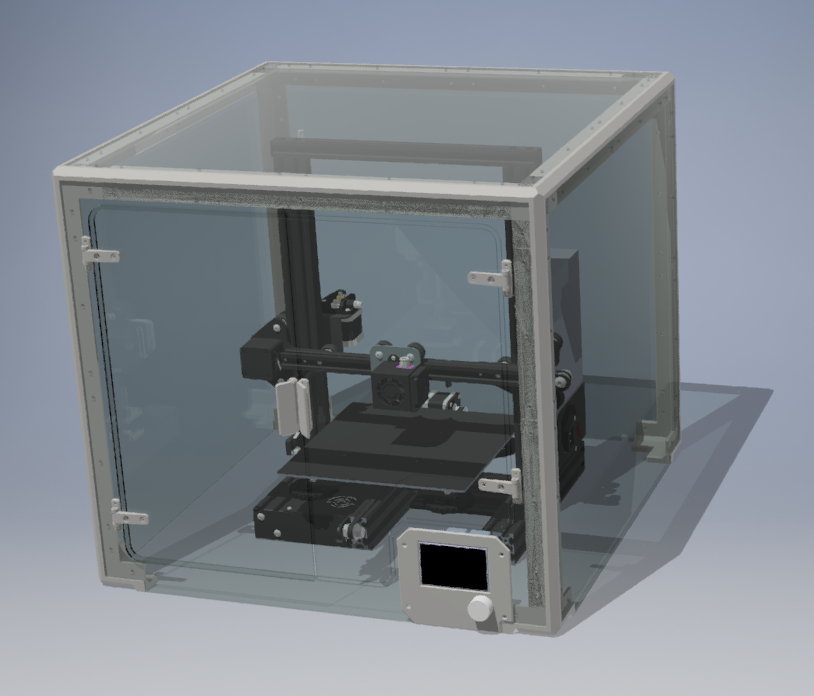
3D printing has come a long way in recent years, and as technology advances, so do the tools and accessories that help ensure optimal results. One such tool is the universal 3D printer enclosure, a must-have accessory that helps maintain a controlled environment for your 3D printing process. However, while these enclosures offer numerous benefits, such as temperature control and dust protection, they can also introduce common issues if not used properly. In this article, we’ll explore how to prevent common problems with a 3D printer enclosure and maximize its potential.
Benefits of a Universal 3D Printer Enclosure
Before diving into solutions, let's quickly revisit the benefits of using a universal 3D printer enclosure:
-
Temperature control: The enclosure helps maintain a consistent temperature, reducing warping or cracking, especially when working with temperature-sensitive materials like ABS or nylon.
-
Protection from drafts and dust: By creating a sealed environment, the enclosure keeps your prints protected from external factors such as dust, drafts, and fluctuating room temperatures.
-
Noise reduction: The enclosure's sturdy construction minimizes printer noise, making it ideal for home or office use.
-
Cleaner workspace: The enclosure prevents debris from contaminating your prints, keeping your workspace cleaner and more organized.
While these benefits are clear, it’s important to properly manage potential issues that can arise with the enclosure.
Common Problems with a Universal 3D Printer Enclosure
Here are some common problems that users face when using a universal 3D printer enclosure, along with tips to prevent them:
1. Overheating Inside the Enclosure
A common issue with 3D printer enclosures is overheating. While the enclosure is designed to stabilize temperature, if not managed properly, it can lead to excessive heat buildup inside, resulting in poor print quality or even printer damage.
How to Prevent Overheating:
-
Use proper ventilation: Ensure the enclosure has adequate ventilation. This helps regulate the temperature and prevents the inside from getting too hot.
-
Monitor temperature: Invest in a temperature monitoring system inside the enclosure. Some enclosures come with built-in temperature control, but it’s always good to double-check.
-
Avoid over-closing the enclosure: Some enclosures can be fully sealed, but if the temperature rises too high, this can cause issues. Make sure there’s airflow to keep things cool.
2. Insufficient Airflow
A lack of airflow within the enclosure can also lead to improper cooling and higher print failure rates. Many 3D printers, especially those printing with filament such as PLA or ABS, need proper airflow to cool the layers as they are deposited.
How to Prevent Insufficient Airflow:
-
Install fans: A simple way to improve airflow in your enclosure is to add a small fan. This helps circulate air and cool down the print area.
-
Check for blocked vents: Make sure the vents of your enclosure are not obstructed by dust or debris.
-
Use a passive ventilation system: Some enclosures include one, allowing cool air to enter while hot air escapes. This can improve airflow significantly.
3. Inconsistent Printing Results
Another issue that may arise with a universal 3D printer enclosure is inconsistent printing results, such as warping, layer adhesion problems, or prints that don't stick to the bed properly.
How to Prevent Inconsistent Results:
-
Calibrate your printer regularly: Regular calibration ensures it runs at its best. Calibration helps align the bed and extruder, ensuring prints are precise.
-
Ensure stable bed temperature: If you're using materials like ABS, a heated print bed is crucial for keeping the first layers adhered to the print bed. Make sure the bed temperature stays within the recommended range for the material.
-
Use proper materials: Always choose the right material for your printer. Some materials require special attention when printed inside an enclosure, such as ensuring that high-temperature filaments are used in a controlled environment.
4. Poor Material Storage
One less obvious issue when using an enclosure is poor material storage. Many people store their filament inside the enclosure, but if the environment is too humid or too dry, it can affect the filament's quality.
How to Prevent Poor Material Storage:
-
Keep the filament dry: Humidity can negatively affect it, causing it to absorb moisture. This can lead to printing defects, such as bubbling or poor adhesion. Use filament dryers or store your filament in a sealed container with silica gel packs.
-
Use airtight containers: Store unused filament in airtight containers with desiccants to protect it from environmental changes. This ensures the material stays in good condition and produces better results.
5. Too Much Noise from the Enclosure
Although one of the main benefits of an enclosure is noise reduction, it can sometimes cause an unintended echo effect. This can happen if the enclosure is too compact or if it amplifies the sound of the 3D printer's motor and fan.
How to Prevent Excessive Noise:
-
Choose a soundproof enclosure: Some enclosures are designed with soundproofing materials that minimize noise.
-
Add padding: If noise is an issue, consider adding foam or rubber pads to absorb vibrations and reduce the overall sound.
-
Place the enclosure on a solid surface: Ensure the enclosure is placed on a sturdy, vibration-resistant surface to reduce noise.
Conclusion
A universal 3D printer enclosure is a valuable tool that can improve your printing results, but, like any other piece of equipment, it requires proper maintenance and attention to perform at its best. By following the simple steps above, you can prevent common issues like overheating, insufficient airflow, inconsistent results, poor material storage, and excessive noise.
Investing time in maintaining your enclosure will help you maximize its benefits and ensure your 3D prints are as flawless as possible. Whether you are a beginner or an experienced 3D printing enthusiast, properly managing your enclosure will lead to better, more reliable results every time.
 Turkish
 English
 Arabic
 French
 Spanish
 Portuguese
 Deutsch
 Dutch
Dutch
 Italiano
 Russian
 Romaian
 Portuguese (Brazil)
 Greek
Greek
