


 Pro Benefits
 Σχετικά
 Όρους
Όρους
 Ιδιωτικότητα
 Child Safety & Protection
 Ειδοποιήσεις
 Ayrush Global It Services Pvt Ltd
10 Mobile App UX Mistakes That Hurt User Retention And How to Fix Them

Think about this for a second: you’ve spent months building a sharp mobile app UX design or a responsive website. The visuals look great, colors pop, maybe you even threw in some slick animations. But when people actually start using it, their excitement eventually fades. They can’t find important features, buttons feel way too small to tap, and the checkout feels more like a frustrating maze.
Mobile UX has grown beyond a ticking-the-box exercise. Now, it’s the frontline where brands either hold onto their customers or lose them outright. Poor mobile user experience impacts engagement, retention, conversions, and brand loyalty, so it really matters.
Let’s walk through the 10 biggest mobile UX mistakes that sneak under the radar and, more importantly, how to fix them. This way, you gain an edge and show some serious digital strategy muscle.
Tiny Touch Targets – A Common Mobile UX Error
Small buttons or links often go unnoticed until users try to tap them. Then it becomes a pain point instantly. When people need to zoom in or aim carefully, it just kills their flow and leads to frustration.
Why should leaders care? Because what might seem like a small annoyance can quickly turn users off. Overlooking this basic UX design mistake in mobile apps signals a disconnect from users’ real needs and expectations.
How to fix it?
Design buttons with a minimum hit area of 44 by 44 pixels. Add plenty of padding to avoid accidental taps. And place important buttons where thumbs can easily reach, usually the bottom center or the right side for right-handed users.
This isn’t just a suggestion. It’s backed by research and mobile UX best practices from Apple and Google. Following this shows you’ve stepped up your UX for mobile apps. Check out these mobile app UX best practices to design experiences that flow naturally.

Slow Load Times – A Major UX Mistake That Hurts Retention
Speed rules here. Even a couple of extra seconds for loading feels like forever when people are on the move. From a leadership view, optimizing performance shows operational discipline and a focus on user needs. It means design, development, and backend teams are collaborating well. That kind of teamwork is a sign your organization really prioritizes mobile app UX design.
What to do?
Compress images and serve them with modern formats like WebP. Cut down JavaScript and CSS to the essentials. Use lazy loading to delay non-critical stuff. Add a content delivery network so assets load fast, depending on where users are.
In short, slow load times are one of the most common UX issues in mobile apps, and fixing them is a business must-have tied directly to keeping users around.
To keep your users engaged, explore our mobile UX design services that focus on building faster, more responsive apps.
Clunky, Overstuffed Navigation – A UX Mobile App Pitfall
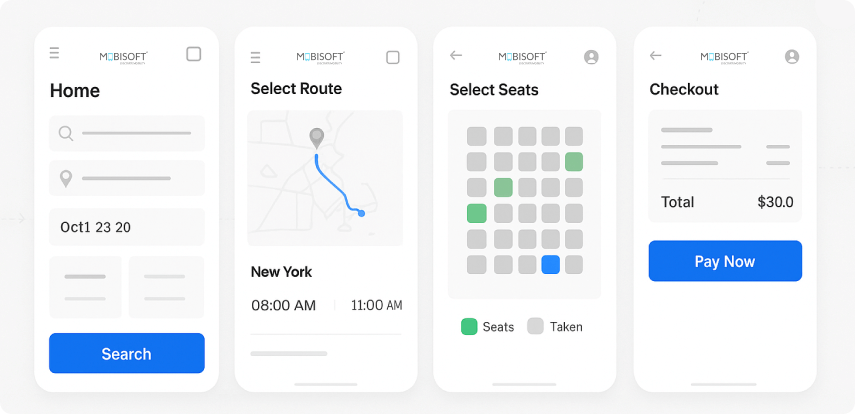
Think of navigation like the GPS for your users. If you pack it with too many options or layer deep menus, you’re basically handing someone a complex map with no landmarks.
The fallout? Users feel lost. Overwhelmed. They get cognitive overload and often give up on their goal. Hick’s Law tells us that decision time goes up with each added option, so less really is more here.
From a leadership perspective, UX isn’t about stuffing every feature into the menu. It’s about figuring out what users really want and guiding them there. Cutting down navigation based on data and research reduces common UX flaws in mobile apps and signals maturity in your approach.
How to improve?
Keep the main navigation options to 3 to 5 clear categories. Use bottom navigation bars so thumbs can easily reach the key spots. Show more complex options only when necessary; that way, users aren’t overwhelmed upfront.
Good navigation follows mobile UX best practices and helps users achieve tasks faster. Simplifying navigation starts with a proven mobile app design process, ensuring users can move through your app with confidence.
Ignoring Thumb-Friendly Design – UX Mistakes That Break Flow
How people hold their phones, mostly with thumbs, matters a lot.
This goes beyond aesthetics. Designing for thumb reachability shows you’re really thinking about users. An approach invested in human-centered mobile UX design reflects leadership quality.
What does that mean practically?
Map out “thumb zones” and avoid putting critical buttons in hard-to-reach spots, like the top-left corner for right-handed users. Make tappable areas bigger near those easy-to-reach places. And test your designs with a diverse group, considering different handedness.
Thinking about ergonomics like this helps prevent poor mobile user experience and shows you want your product to work well for people.
Read more- https://mobisoftinfotech.com/resources/blog/ui-ux-design/mobile-app-ux-mistakes
 Greek
Greek
 English
 Arabic
 French
 Spanish
 Portuguese
 Deutsch
 Turkish
 Dutch
Dutch
 Italiano
 Russian
 Romaian
 Portuguese (Brazil)
