


 Pro Benefits
 Über
Über
 Bedingungen
 Datenschutz
 Child Safety & Protection
 Benachrichtigungen
 Ayrush Global It Services Pvt Ltd
Step-by-Step: How to Build Your First Salesforce AI Project
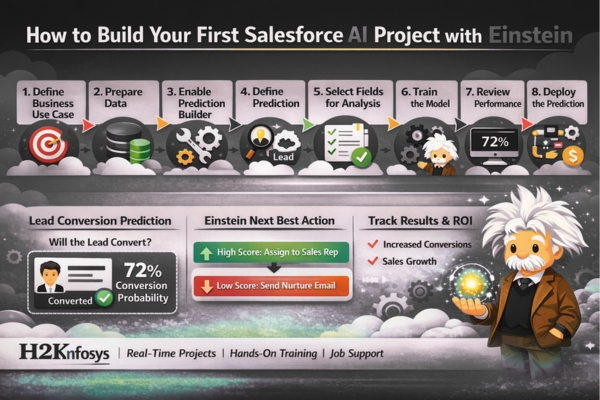
In today’s competitive digital economy, H2Kinfosys empowers professionals to master cutting-edge technologies like Salesforce and AI, helping them build real-world, job-ready solutions with confidence. If you're looking to step into the world of intelligent CRM, this step-by-step guide will walk you through building your first Salesforce AI project using Salesforce Einstein.
Artificial Intelligence is no longer optional in CRM platforms. Businesses today rely heavily on predictive insights, automation, and personalized customer experiences. That’s where Einstein AI Salesforce capabilities come into play.
Let’s explore how you can build your first AI Salesforce project from scratch.
Understanding Salesforce AI and Einstein
Before jumping into the project, it’s important to understand what Salesforce Einstein is and how it fits into the broader Salesforce ecosystem.
Salesforce Einstein is Salesforce’s native AI layer embedded across the platform. It enables predictive analytics, automated insights, intelligent recommendations, and AI-driven workflows directly inside Salesforce.
Key Components of Einstein AI:
-
Einstein Prediction Builder
-
Einstein Discovery
-
Einstein Next Best Action
-
Einstein Bots
-
Einstein Lead & Opportunity Scoring
With Einstein AI, you don’t need deep data science knowledge. Salesforce allows administrators and developers to configure AI models using clicks rather than code.
Step 1: Define Your Business Use Case
Every successful AI Salesforce project starts with a clear objective.
Ask yourself:
-
What business problem are you solving?
-
What decision do you want AI to predict?
-
What measurable outcome are you targeting?
Example Beginner Use Cases:
-
Predict which leads are likely to convert
-
Forecast opportunity closure probability
-
Identify cases likely to escalate
-
Recommend the next best action for sales reps
For your first project, we’ll build:
Lead Conversion Prediction using Salesforce Einstein
Goal: Predict whether a lead will convert into an opportunity.
Step 2: Prepare Your Salesforce Environment
Before enabling Einstein AI Salesforce features, ensure:
-
You have a Salesforce Enterprise or Unlimited Edition
-
Einstein Prediction Builder is enabled
-
You have at least 200–400 lead records
-
Historical data includes both converted and unconverted leads
Data Preparation Checklist:
-
Clean incomplete fields
-
Standardize industry, region, revenue fields
-
Remove duplicate records
-
Ensure meaningful historical patterns exist
AI is only as good as your data. Garbage in, garbage out.
Step 3: Enable Einstein Prediction Builder
Now we begin the actual AI Salesforce configuration.
Steps:
-
Go to Setup
-
Search for Einstein Prediction Builder
-
Click “Get Started.”
-
Create a new Prediction
You will now configure your AI model.
Step 4: Define the Prediction
When setting up your first Einstein AI model, Salesforce will ask:
1. What do you want to predict?
Select:
-
Object: Lead
-
Field: Converted (True/False)
This tells Salesforce Einstein to analyze past lead data and predict conversion likelihood.
2. Define Positive Outcome
Positive Outcome:
-
Converted = True
Step 5: Select Fields for AI Analysis
Now you’ll choose which fields Einstein AI Salesforce should analyze.
Include fields such as:
-
Industry
-
Annual Revenue
-
Lead Source
-
Country
-
Company Size
-
Job Title
Avoid:
-
Fields that are filled after conversion
-
Manually biased fields
Einstein will automatically evaluate which factors most influence conversion.
Step 6: Train the Model
Click “Build Prediction.”
Salesforce Einstein will:
-
Analyze historical lead records
-
Identify patterns
-
Calculate statistical correlations
-
Generate a predictive model
This process usually takes 30–90 minutes.
Behind the scenes, Salesforce uses machine learning algorithms to generate probability scores.
Step 7: Review Model Performance
After training completes, you’ll see:
-
Prediction Quality Score
-
Top Influencing Factors
-
Field Impact Analysis
-
Accuracy Insights
Example Insights:
-
Leads from “Webinars” convert 35% more often
-
Annual revenue above $10M increases conversion likelihood
-
Certain industries show lower conversion
This is where AI Salesforce truly adds business value and actionable intelligence.
Step 8: Deploy the Prediction
Now that the model is ready:
-
Click “Deploy.”
-
Add the prediction field to the Lead page layout
-
Enable real-time scoring
Sales reps will now see:
-
Conversion Probability (%)
-
Top contributing factors
Example:
“This lead has a 72% chance of converting.”
This enables data-driven selling.
Step 9: Automate Actions Using AI
To make your project more powerful, integrate:
Einstein Next Best Action
Create workflows such as:
-
If conversion probability > 70%, assign to senior sales rep
-
If probability < 30%, send automated nurture email
-
Trigger follow-up tasks automatically
This is where Salesforce and AI integration create business automation at scale.
Step 10: Measure Business Impact
AI projects must demonstrate ROI.
Track:
-
Conversion rate improvement
-
Sales cycle reduction
-
Revenue growth
-
Sales productivity increases
After 60–90 days, compare:
-
Pre-AI performance
-
Post-AI performance
Most organizations see 10–30% efficiency improvements when implementing Einstein AI Salesforce correctly.
Expanding Your First Salesforce AI Project
Once comfortable, you can build advanced AI Salesforce solutions:
1. Opportunity Scoring
Predict deal closure probability.
2. Case Escalation Prediction
Predict which support tickets may escalate.
3. Churn Prediction
Use Einstein Discovery for customer retention models.
4. AI Chatbots
Build conversational AI using Einstein Bots.
Common Beginner Mistakes to Avoid
Even though Salesforce Einstein simplifies AI, beginners often make mistakes:
-
Using insufficient historical data
-
Ignoring data quality
-
Choosing the wrong target field
-
Not aligning AI output with business process
-
Deploying without user training
AI adoption requires both technical and change management strategies.
Why Salesforce AI Skills Are in High Demand
Companies today want professionals who understand both CRM and AI.
The combination of:
-
CRM data management
-
Predictive modeling
-
Workflow automation
-
Business analytics
makes Salesforce AI specialists extremely valuable.
According to industry reports:
-
AI Salesforce roles are among the fastest-growing CRM positions
-
Salaries are 15–25% higher for professionals with AI expertise
-
Enterprises are heavily investing in intelligent CRM
Career Path: Becoming a Salesforce AI Professional
To master Einstein AI, you should develop skills in:
-
Salesforce Administration
-
Data modeling
-
Business process automation
-
Analytics fundamentals
-
CRM reporting
-
AI-driven configuration
A structured learning approach is essential.
That’s why H2Kinfosys offers:
-
Live instructor-led Salesforce training
-
Hands-on Einstein AI projects
-
Real-time business scenarios
-
Resume building workshops
-
Mock interviews
-
Job placement support
Unlike self-paced tutorials, job-oriented programs focus on employability.
Final Thoughts: Your First Step into AI Salesforce
Building your first Salesforce Einstein project may seem intimidating at first, but the platform is designed to make AI accessible to professionals without data science backgrounds.
By following this step-by-step guide, you have:
-
Defined a real business use case
-
Configured Einstein Prediction Builder
-
Trained a machine learning model
-
Deployed AI-driven lead scoring
-
Automated intelligent workflows
This is just the beginning.
The future of CRM is intelligent, predictive, and automated. Organizations are rapidly adopting Einstein AI Salesforce capabilities to stay competitive.
If you want to future-proof your career in Salesforce and AI, now is the time to start building hands-on projects.
Your journey into AI Salesforce begins with one project and that project could open doors to high-demand, high-paying roles in the CRM and AI ecosystem.
Start building. Start learning. Start leading.
 Deutsch
 English
 Arabic
 French
 Spanish
 Portuguese
 Turkish
 Dutch
Dutch
 Italiano
 Russian
 Romaian
 Portuguese (Brazil)
 Greek
Greek
