


 Pro Benefits
 Über
Über
 Bedingungen
 Datenschutz
 Child Safety & Protection
 Benachrichtigungen
 Ayrush Global It Services Pvt Ltd
Voter ID Card Print Online Process for Downloading Digital Copy
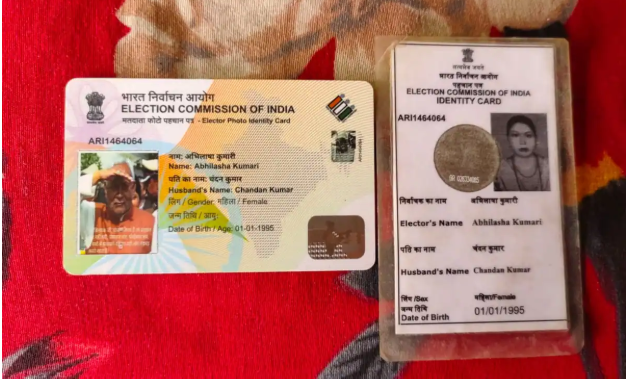
The Voter ID card is one of the essential documents for Indian citizens. Additionally to serving as identity proof, it is also a way for people to engage in the democratic process through voting in elections. The Election Commission of India (ECI) has made it very easy to access and print your Voter ID card online thanks to various digital initiatives. The article will walk through the complete process of printing the Voter ID card online, downloading the copy, and correcting your name on the Voter ID card.
Importance of the Voter ID Card
The Voter ID card serves multiple purposes:
-
Voting Rights:The Voter ID card is the key for eligible citizens to vote in the elections of the Lok Sabha, state assemblies, and local governing bodies.
-
Proof of Identification: Voter ID card is considered a reliable identification document and it is accepted for various purposes like applying for government assisted schemes, getting a loan, and registering for other certifications.
-
Ease in Checking Electoral Rolls: The Voter ID card also ensures that a person can easily check if he/she is registered to vote as it proves his/her name on the electoral list.
Technology has come to the rescue. Today, citizens can access their Voter ID cards online, print them, and also have a digital copy for their convenience.
Steps to Access Voter ID Card Online
The registered details related to your Voter ID card will be needed for both the download and print processes, which are getting your Voter ID card online. Here are the steps to follow:
1. Visit the Official Election Commission of India Website
To begin with, it is a must to regularly check the official site of ECI (Election Commission of India) (https://eci.gov.in) or the National Voter's Service Portal (https://www.nvsp.in) to obtain the correct information. These platforms have simple and intuitive interfaces along with offering services concerning the verification and updating of voter particulars.
2. Log In or Create an Account
If you are an already registered user, then log in to the portal using your registered mobile number, email ID, or EPIC (Electors Photo Identity Card) number. If you are not yet a registered user, then create a new account by selecting one of the options: “Registration for New Voter” or “Login with OTP.”
3. Verify Your Details
After signing in, click on the menu and select "Search Your Name in Voter List". Fill in your state, district and personal details like name, date of birth and registered mobile number as required.
You can also opt for using your EPIC number for a speedy search.
4. Download and Print Your Voter ID Card
Soon after your particulars are retrieved from the electoral database, you will be able to see your Voter ID card over the internet. Look out for the option to get the e-Voter ID. The virtual copy will be made in PDF format, and you can keep it on your gadget. For printing the Voter ID card, you have to just open the file you downloaded and make use of a printer to get a physical copy.
Benefits of Downloading Digital Voter ID
Downloading your Voter ID card online has several advantages, such as:
-
Convenience: You have the convenience of accessing your Voter ID card from wherever you are, and hence, you can refrain from making physical visits to government offices.
-
Time-Saving: The online services do away with the requirement for manual procedures that consume a lot of time for obtaining or updating your Voter ID card.
-
Eco-Friendly: You can preserve a digital copy and refrain from printing unless it is absolutely necessary.
How to Correct Name in Voter ID Card
There might be some errors in personal details such as name, address, or date of birth on your Voter ID card but they can be rectified without hassle through the online services provided by the Election Commission of India. To know how to correct name in voter id card, follow the below-mentioned steps:
1. Visit the NVSP Portal
Log in to the National Voter’s Service Portal (https://www.nvsp.in).
2. Select "Correction of Entries"
Once you are signed in, select the "Correction of Entries in the Electoral Roll" option which will redirect you to Form 8.
3. Fill Out Form 8
In Form 8, write your present name and the new one. In addition, upload any documents (for example, Aadhar card or passport) that confirm the correct spelling of your name as a support.
4. Submit the Form Online
After you have filled the form, submit it through the online portal. An acknowledgment number will be provided to you for checking the status of your application.
5. Wait for Verification
The Election Commission upon verifying the documents you have provided will then grant your application. The digital database will then be updated with the new Voter ID card and you will be able to print it successfully after the approval has been granted.
Key Considerations for Voter ID Card Print
When printing the voter id card print, ensure you:
-
Paper Quality: Use good-quality paper to print your digital copy for long-term durability.
-
Detail Verification: Check all details for accuracy in your digital version before printing.
-
Safe Storage: Maintain both digital and physical copies safely for future use.
Conclusion
Governance's growing technological integration has made tasks like downloading and printing your Voter ID card online to be very smooth and straightforward. The Election Commission of India has created a user-friendly platform that allows you to quickly get your Voter ID card printed without any trouble in retrieving, downloading, and so on. Not only that, the corrections of the name and other details on the card can also be made totally through the portal, so, it is really fast and efficient to be named. It is critical for responsible citizens to keep their Voter ID card details accurate and updated as it is a means of identification not just because the voting rights - one of the most important democratic responsibilities - are exercised through it. By simply following the mentioned steps and processes, you can get access to your Voter ID card online, download its digital copy, and even correct any mistakes very quickly and easily.
 Deutsch
 English
 Arabic
 French
 Spanish
 Portuguese
 Turkish
 Dutch
Dutch
 Italiano
 Russian
 Romaian
 Portuguese (Brazil)
 Greek
Greek
